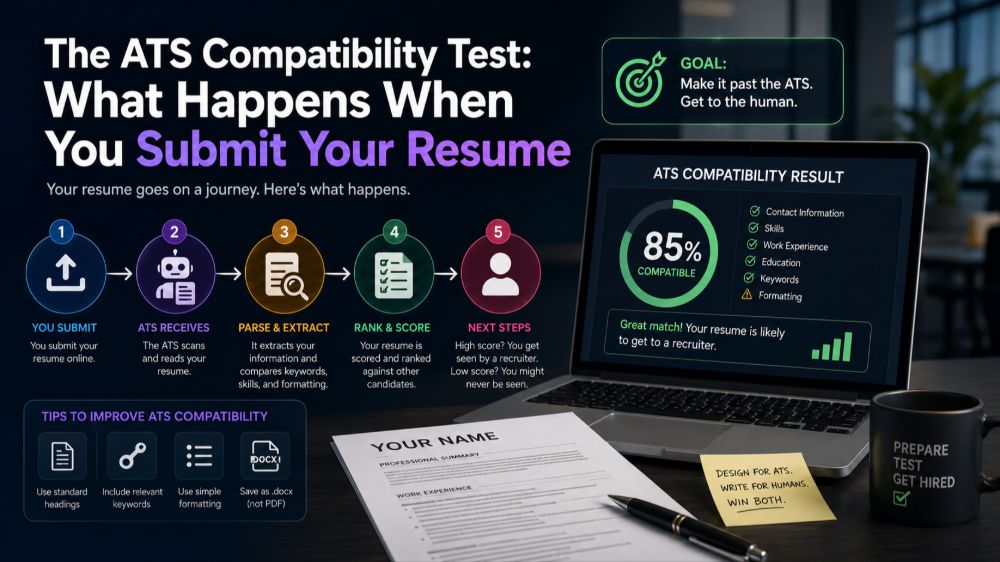
What Actually Happens After You Click Submit
Your carefully crafted resume doesn't go straight to a hiring manager's desk. Instead, it enters an Applicant Tracking System that parses, categorizes, and ranks your application against hundreds of others. Understanding this process isn't about gaming the system—it's about ensuring your qualifications are actually readable by the software that acts as the first gatekeeper.
Most job seekers know ATS exists, but few understand what these systems actually do with their documents. Let's walk through the real journey your resume takes and what you can do at each stage.
The Parsing Stage: Where Most Resumes Fail
When your resume enters an ATS, the software attempts to extract information and organize it into structured fields: name, contact information, work experience, education, skills, and more. This parsing process is where many resumes break down, even if they look perfect to human eyes.
Complex formatting confuses parsers. Tables, text boxes, headers, and footers often get scrambled or ignored entirely. A resume with your contact information in the header might register in the system as having no phone number at all. That beautiful two-column layout? The ATS might read straight across both columns, turning your "Marketing Manager at Adobe Systems" into "Marketing Manager Skills: Adobe Systems Photoshop."
The safest approach is intentional simplicity. Use a single-column layout with clearly labeled sections. Stick to standard section headings like "Work Experience" and "Education" rather than creative alternatives like "My Journey" or "Where I've Made Impact." The parser is looking for conventional markers.
Format Choices That Break or Boost Parsing Accuracy
Not all file formats are treated equally. While most modern ATS can handle both PDF and Word documents, some older systems still struggle with PDFs, especially if they contain images or unusual fonts. Unless the job posting specifies a format, Word documents (.docx) remain the safest choice for maximum compatibility.
For formatting elements, follow these specific guidelines:
- Use standard fonts (Arial, Calibri, Georgia, Times New Roman) in 10-12 point size
- Bold and italics are fine; avoid underlining, which can interfere with parsing
- Use standard bullet points (•) rather than custom symbols or icons
- Avoid images, logos, charts, or graphs—they're invisible to most ATS
- Save tables for simple uses only, or avoid them entirely
- Don't use text boxes or columns created through advanced layout features
Keyword Matching: More Nuanced Than You Think
ATS systems do analyze keywords, but not as simplistically as many job seekers assume. Modern systems use contextual matching, not just simple word counting. Simply stuffing your resume with repeated keywords actually works against you, both in ATS rankings and when a human eventually reads it.
Instead, focus on strategic keyword integration. Read the job description carefully and identify technical skills, required qualifications, and industry terminology. Incorporate these naturally into your work experience descriptions where truthful and relevant. If the posting mentions "stakeholder management," don't just list it as a skill—demonstrate it in a bullet point describing a project where you coordinated with cross-functional stakeholders.
Use variations of important terms. If the role requires "project management," your resume might mention "managed projects," "project coordination," and "project management" in different contexts. This creates natural relevance without repetition.
The Human Review: Why ATS Formatting Still Needs to Look Good
Here's what many guides miss: you're not optimizing solely for robots. Resumes that pass ATS screening still need to impress human reviewers. An ATS-friendly resume shouldn't look like a plain text document from 1995.
You can maintain visual appeal while staying ATS-compatible. Use adequate white space, clear section breaks, and thoughtful formatting hierarchy with different heading sizes. A clean, professional design that happens to use simple formatting will both parse correctly and read beautifully.
The goal is transparent optimization. Your resume should be genuinely tailored to the role, with formatting choices that serve both machine parsing and human readability.
Testing Your Resume's ATS Compatibility
Before sending out applications, run a simple test. Copy all the text from your resume and paste it into a plain text editor like Notepad. Does the information appear in a logical order? Is anything missing or scrambled? This stripped-down view approximates what an ATS sees during parsing.
You can also use free ATS scanning tools available online, though take their scores with some skepticism. No tool perfectly replicates every ATS system, but they can identify obvious formatting problems.
Making the System Work For You
Understanding ATS isn't about creating a separate "ATS version" of your resume. It's about making smart formatting and content choices that serve both purposes: getting through automated screening and impressing hiring managers.
Start with strong, relevant content that genuinely matches the role. Then present that content in a clean, simple format that both humans and software can easily process. This approach doesn't require sacrificing your professional presentation—it requires thoughtful design choices that prioritize clarity and readability.
For more specific guidance on resume formats that work for your industry, and to see examples of ATS-friendly designs across different fields, you can browse real resume samples by job title on Nohaya.